We now have a booking system in place for the Bouverie Hall. This page is intended to help you to navigate the procedure. If you have any trouble the system’s help can be found here and if that is not enough please email us (bookings@bouveriehall.co.uk).
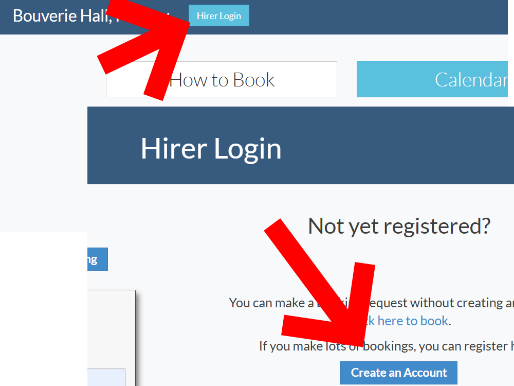
1. Visit our booking calendar if you just want to check availability. To continue ….
2. From the calendar. click link at top of screen and then ….
3. Register on the right of screen that appears.
4. If unclear see the picture below (more details below that):
You can also reach this page via the contact page ( then click the link to booking calendar).
Provided you login you can create repeat bookings in the system (only single ones if you do not). You can also copy an existing booking to a new one (or series).
NOTE: You can edit individual bookings to vary things like time but be careful not to override this later when changing all of them.
Booking part of the hall
In some circumstances we may allow booking of part of the hall. To do this please follow this guidance:
- Divided on it’s own = Small end
- Hall on its own = Whole hall (unless Divided booked elsewhere)
- Hall + Divided = large end only (if approved)